If you look after more than a handful of domains, registrar reminder emails stop being enough, and you need something that watches the dates for you. The tools that do it fall into four groups: a spreadsheet you maintain, a self-hosted app, an uptime monitor that also checks expiry, and a tracker built for renewals. Which group fits depends on how many domains you have, whether you also need SSL certificates covered, and whether you want to run anything yourself.
We make YoTrackr, which is one of the tools below, so we have a stake in this comparison. We took every price and limit from each tool's own page, checked on 26 October 2026, and we say where a page was unclear. Prices and plans change, so confirm on the vendor's site before you buy.
The short answer
| If you | Pick |
|---|---|
| Have a few domains and check them yourself now and then | A free expiry checker plus calendar reminders |
| Want to run your own server and pay nothing | DomainMOD |
| Already pay for uptime monitoring | UptimeRobot, StatusCake or Site24x7, using their expiry checks |
| Want a monitor that only watches domains, SSL and DNS | Domain Monitor or Expiroo |
| Track domains, SSL, hosting and subscriptions in one list, with no bank link | YoTrackr |
What to look for
- Several warnings before the date. One email a week before expiry is easy to miss. Look for reminders at more than one interval.
- SSL certificates as well. A lapsed certificate takes a site down as visibly as a lapsed domain. See how to monitor SSL certificates on client websites.
- Many registrars in one list. The registrar's own reminders only cover the domains in that account.
- Who maintains it. A tool you have to host and update yourself is only as reliable as your upkeep.
The free baseline: a checker and calendar reminders
Every domain's expiry date sits in its public registration record, so you can read it without a registrar login. Our free domain expiry checker shows the expiry date and registrar for any domain, with no signup, and the SSL certificate checker does the same for certificates. Add each date to a calendar with an alert a month ahead and you have a working system for a few domains. It breaks down when the list grows, because nobody keeps the dates updated. The domain expiry checklist covers what to do before a date arrives.
Self-hosted: DomainMOD
DomainMOD is an open source domain and internet asset manager, written in PHP and MySQL under the GPL-3.0 licence. Its task scheduler emails you about upcoming domain and SSL certificate expirations. It needs a server you maintain, with a supported PHP and MariaDB or MySQL version, and a cron job running every 10 minutes. It is free in money and costs time. The repository's copyright runs to 2025 and its page lists no releases, so we could not confirm how actively it is maintained: check the commit history before you rely on it.
Uptime monitors that also check expiry
These watch whether your site is up, and add domain and SSL expiry checks. They suit you if you already want uptime monitoring. They are less suited to a list of domains that do not run websites.
- UptimeRobot. The free plan offers 50 monitors at a 5-minute interval. Paid plans start with Solo at $9 a month on annual billing ($10 monthly). Its pricing page lists SSL and domain expiry monitoring on the free plan, but its comparison table says SSL monitoring is only in paid plans, so the page contradicts itself. Domain expiry alerts are described at 30, 14 and 7 days before expiry.
- StatusCake. The free plan includes 10 uptime monitors, one domain monitor and one SSL monitor at 5-minute intervals. Its Superior plan is listed at $20.41 and $24.49 a month without saying which is annual. The page does not show which plans include the expiry alerts.
- Site24x7. Web Uptime starts at $10 a month ($9 billed annually), and its comparison lists Domain and SSL Expiry Monitoring on the web plans. It has a 30-day free trial and a free forever plan for up to 50 resources, but the page does not say whether that free plan includes expiry monitoring.
We left out Pingdom: its pricing page lists uptime, page speed and real-user monitoring, and says nothing about domain or SSL expiry.
Monitors built for domains, SSL and DNS
- Domain Monitor. Domain expiry, uptime and SSL monitoring in one service, with a free domain monitoring option and a Pro plan. Its alerts go out by email, SMS, Slack, Discord, webhooks and more, with SMS reserved for Pro. The page gives no prices.
- Expiroo. Watches domains, uptime, SSL certificates and DNS. The Pulse plan is $9.99 a month or $59.99 a year for up to 40 websites, and Business is $19.99 a month or $89.99 a year with unlimited websites. Every paid plan starts with a 7-day free trial, and there is no ongoing free plan. Domain reminders go out at 90, 30, 14, 7, 3 and 1 days, and SSL is checked daily.
A renewal tracker: YoTrackr
YoTrackr tracks domains, hosting, SSL certificates, SaaS and streaming subscriptions in one list, which is the difference from the tools above: it is built around renewals, not around checking whether a site is up. You add a domain and press Magic Fetch, which reads the expiry date and registrar from the domain's public RDAP record and checks the SSL certificate (the steps). Reminders then run from the saved date: in the app on every plan, and by email on Pro and Team (how reminders work).
What it does not do: it does not watch your domains in the background and rewrite the dates on its own. You press Magic Fetch to refresh a domain, and the result is kept for 6 hours. It does not monitor uptime. If you need either, pair it with an uptime monitor. It is free to start, with up to 10 subscriptions and 3 domains. The paid plans are on the pricing page, and the lifetime plans launch through AppSumo, with a waitlist on the AppSumo page on this site until the listing opens. Agencies with many client domains can see how it fits a web agency.
Comparison summary
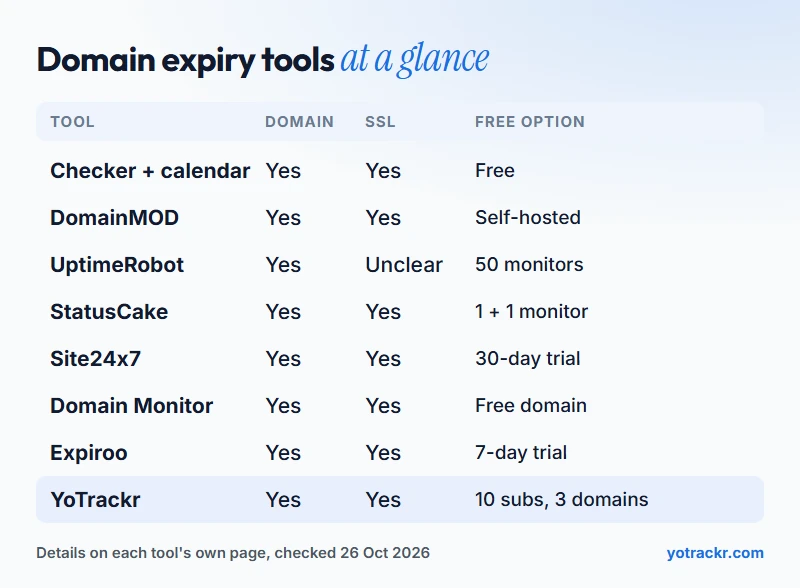
| Tool | Type | Listed price | Free option |
|---|---|---|---|
| Checker plus calendar | Manual | Free | Yes |
| DomainMOD | Self-hosted | Free, GPL-3.0 | Yes, you host it |
| UptimeRobot | Uptime monitor | From $9 a month (annual) | 50 monitors |
| StatusCake | Uptime monitor | Superior $20.41 or $24.49 a month | 1 domain and 1 SSL monitor |
| Site24x7 | Uptime monitor | From $10 a month ($9 annual) | Free plan, 30-day trial |
| Domain Monitor | Domain monitor | Not listed | Free domain monitoring |
| Expiroo | Domain monitor | $9.99 a month or $59.99 a year | 7-day trial only |
| YoTrackr | Renewal tracker | See pricing page | 10 subscriptions, 3 domains |
Over a year, the listed annual prices come to about $108 for UptimeRobot Solo, $108 for Site24x7 Web Uptime on annual billing and $59.99 for Expiroo Pulse. We have not added YoTrackr's figure here, because its recurring plans are not on sale yet and its lifetime plans launch on AppSumo.
Common mistakes
- Trusting auto-renew alone. A card that expired or a changed billing address stops it, and nothing warns you.
- Tracking domains but not SSL. Both lapse in the same way. Keep them in the same system.
- Sending reminders to one person. If they leave, the notices go to an inbox nobody reads. Use a shared address.
- Never checking the date. A tracker is only as good as the dates in it. Recheck after every renewal or transfer.
Frequently asked questions
Do I need separate tools for domains and SSL certificates? Not necessarily. Several of the tools above cover both, and so does YoTrackr. What matters is that both are watched, since either one lapsing takes the site down.
Is a free tool enough for an agency? For a handful of domains, a free checker plus calendar alerts works. With dozens of client domains across registrars, the dates drift and a tool that holds them in one list saves you from missing one.
How does a tool know a domain's expiry date? From the domain's public registration record. For most domain endings that is RDAP, which replaced WHOIS. RDAP vs WHOIS explains the difference.
What happens if a domain expires? It moves through stages that get more expensive and less certain. What happens when a client's domain expires shows the timeline.
Does YoTrackr monitor my domains automatically? No. You press Magic Fetch to read the current expiry date, and reminders run from the saved date. It does not watch for changes in the background.
Which tool is cheapest? A free checker with calendar alerts, then DomainMOD if you can host it, then the free tiers of the uptime monitors. Among paid options the listed annual prices above are the best guide.
Keep reading. Before you pick a tool, the domain expiry checklist shows what to track for every domain. If your list also has subscriptions, read the best subscription tracker apps.
Related reading
- Domain Expiry Checklist: Never Miss a Renewal
- What Happens When a Client's Domain Expires
- RDAP vs WHOIS: What Actually Changed
- How to Monitor SSL Certificates on Client Websites
- Hosting Renewal Checklist to Avoid Losing Your Website
- Domain or SSL check says "unavailable"
- Renewal calendar
- Keep a wishlist