To cancel Rocket Money Premium, open Settings, choose Membership, tap Manage, drag the price slider all the way left to $0 a month, and confirm with Cancel Subscription. You keep Premium until the end of the billing period you already paid for, and your account stays open. Deleting the account is a separate step, and it cannot be undone.
We make YoTrackr, a tracker with no bank link, so we have a stake in this topic. The steps below come from Rocket Money's own Premium membership help article, its account deletion article and its Terms of Service, checked on 24 October 2026. App menus change, so if a button has moved, follow what you see on screen.
The short answer
| You want to | Do this |
|---|---|
| Stop paying for Premium | Settings, Membership, Manage, slider to $0, Cancel Subscription |
| Pay less but keep Premium | Same screen, move the slider to a lower price, Update Subscription |
| Remove your data completely | Cancel Premium first, then delete the account from Profile |
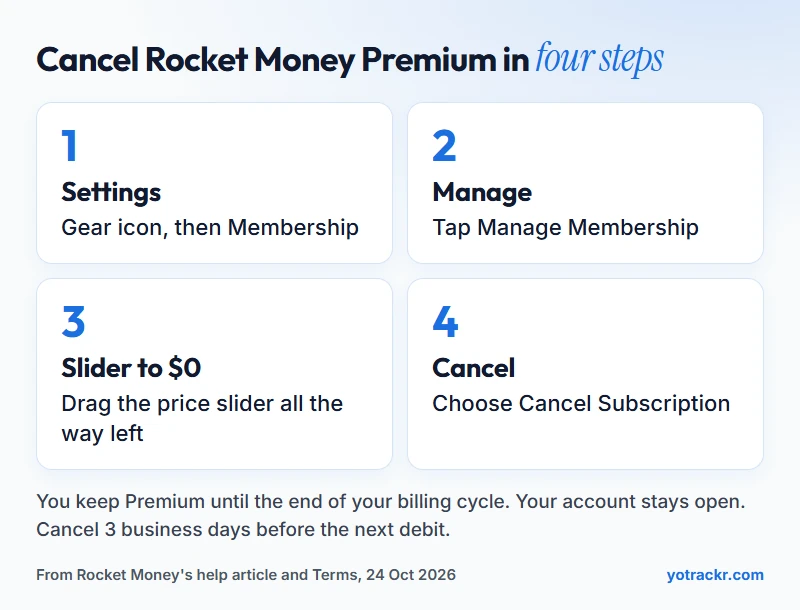
Cancel Premium in the mobile app
- Tap the Settings icon (the gear, top left), then choose Membership.
- Tap Manage Membership.
- Move the slider all the way left to $0/month.
- Tap Cancel Subscription and follow the prompts.
Cancel Premium on the website
- Click the Settings icon (the gear, left side), then choose Membership.
- Click Manage, in the upper right corner.
- Move the slider all the way left to $0/month.
- Click Cancel Subscription and complete the prompts.
Guides written by users report a few extra screens before the final button, such as an offer to stay or a short survey. Rocket Money's own article does not list them, so treat that as a heads-up rather than a rule. Keep going until you reach a confirmation, then take a screenshot of it.
What happens after you cancel
- You keep Premium until the cycle ends. Rocket Money says cancellation takes effect at the end of your billing cycle, and you keep Premium features until then.
- Your account stays. Cancelling Premium does not delete your Rocket Money account. You fall back to the free plan.
- Active bill negotiations stay in place. Cancelling Premium does not stop a negotiation that is already running.
- Emails and notifications continue unless you change your alert settings in the app or online.
Do not cancel on the last day
Rocket Money's Terms say that to stop a scheduled debit you must notify it at least 3 business days before the next debit date. So cancel a few days before your renewal, not on the day. Afterwards, check your next card or bank statement to confirm that no new Premium charge appeared. If one did, contact Rocket Money's support through the in-app chat, and if that does not fix it, you can dispute the charge with your bank.
What about a refund?
Rocket Money's Terms do not state a refund policy for Premium or Premium+ fees, and its help article does not either. Ask support through the in-app chat if you were charged by mistake. The only refund wording in the Terms is for bill negotiation: that fee is non-refundable unless an error was made during the negotiation.
If you only want to pay less
You do not have to cancel to cut the cost. Rocket Money says you can adjust your monthly price at any time. In the app, go to Settings, then Membership, then Manage Membership, then Change Monthly Fee, move the slider and tap Update Subscription. On the website, go to Settings, Membership, Manage, set the slider and click Update Subscription. What the slider's range is and what each price includes is covered in how much Rocket Money costs in 2026.
If the charge shows up as Apple or Google
Rocket Money's article does not say how App Store and Google Play billing is handled. As a general rule, a subscription that Apple or Google bills can only be cancelled in that store, so if your charge appears on your statement as Apple or Google, cancel it there. If it appears as Rocket Money, use the steps above.
Cancelling Premium is not the same as deleting your account
Deleting the account is a separate action, and Rocket Money's article lists what to do first: cancel your Premium membership, cancel any active bill negotiations, and close any active financial goals. Then:
- Mobile app: tap Settings (the gear, upper left), choose Profile, scroll to the bottom, tap Delete My Account and confirm with Yes, I'm Sure.
- Website: click the gear icon in the left sidebar, choose Profile, scroll to the bottom and select Delete Rocket Money Account, then confirm.
Deleting permanently erases all of your Rocket Money data and cannot be undone. The Terms say your login is deactivated immediately and the account data is removed within 48 hours, subject to its Privacy Statement.
Before you delete, copy your subscription list somewhere you control: the service names, prices and renewal dates. A spreadsheet works, and so does a tracker you fill in yourself. Our guide to tracking your subscriptions step by step shows what to write down for each one, and YoTrackr can import a CSV if you already have a list.
Cancelling other subscriptions is a different feature
Premium members can also ask Rocket Money's team to cancel subscriptions they pay for elsewhere, such as a streaming service. That is not the same as cancelling your own Premium plan. Rocket Money says these requests usually take 2 to 10 days. If you would rather do the cancelling yourself, our guide to cancelling unused subscriptions for good walks through it, including services that make it hard.
Moving to something that does not need a bank link
If you are leaving because you do not want a bank account linked, a manual tracker covers the same job without the link. YoTrackr is free to start, with up to 10 subscriptions and 3 domains, and it also tracks domain, hosting and SSL expiry dates, which a bank-based tool cannot see. The paid plans are on the pricing page, and the lifetime plans launch through AppSumo, with a waitlist on the AppSumo page on this site until the listing opens. For other options, see Rocket Money alternatives with no bank login.
Frequently asked questions
How do I cancel Rocket Money Premium? Go to Settings, then Membership, then Manage. Move the slider to $0 a month and choose Cancel Subscription. You keep Premium until the end of the billing cycle.
Does cancelling Premium delete my account? No. Your account stays open on the free plan, active bill negotiations stay in place, and notifications continue unless you change your alert settings.
Will I get a refund if I cancel mid-month? Rocket Money does not state a refund policy for Premium fees in its Terms or help article. You keep access until the cycle ends, and you can ask support in the in-app chat if you were charged by mistake.
How do I delete my Rocket Money account? Cancel Premium and any active bill negotiations first, then go to Settings, Profile and scroll to the bottom to delete the account. Deleting is permanent and cannot be undone.
Can I just lower the price instead of cancelling? Yes. Rocket Money says you can adjust your monthly price at any time using the slider under Membership, then Manage, then Update Subscription.
Why was I charged after I cancelled? A charge can still go through if you cancel close to your renewal, because Rocket Money's Terms ask for notice at least 3 business days before the next debit. Check your statement, then contact support in the in-app chat, and dispute it with your bank if needed.
Keep reading. Not sure whether Premium is worth keeping? Is Rocket Money worth it goes through who gets value from it, and how much Rocket Money costs in 2026 has the yearly numbers.
Related reading
- How Much Does Rocket Money Cost in 2026? Free, Premium and Premium+
- Is Rocket Money Worth It? Pricing and Fees Explained
- Rocket Money Alternatives With No Bank Login
- How to Cancel Unused Subscriptions for Good
- How to Track Your Subscriptions, Step by Step
- Is Rocket Money Safe? What Linking Your Bank Really Means
- Add an item: every field explained